Data Management
OpenPAI Marketplace uses Azuere Blob Storage as data storage system. In marketplace, it is recommended to use Azure Storage Explorer as data management tool for both upload and download, and pai-copy tool as an CLI utility to help process data.
Data Management by Azure Storage Explorer
Installation
As prerequisites, you need download and install Azure Storage Explorer at first.
Get Connection String
It is suggested to use connection string to authorize Azure Storage Explorer access. Marketplace provide an api https://<openpaimarketplace_rest_server_url>/storages/blobs?type=blob to get a connection string for Azure Blob. You could use it directly in Azure Storage Explorer.
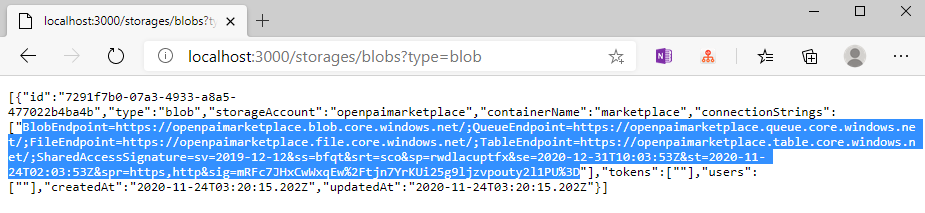
Connect to Azure Storage Service
Following gif shows how to use connection string in Azure Storage Explorer to connect to your Azure Storage Service. The main steps are:
- Click "Open Connect Dialog" button at sidebar.
- Select "Use a connection string" option.
- Paste your connection string. If there warns you any connection string error, you should go and see SAS authentication tutorial to get the right access.
- Trust and connect.

After connection established, you can browse, download and upload files. For detailed usage, see Azure Storage Explorer Documents.
Data Upload by pai-copy
pai-copy is an CLI tool to help user upload their data in OpenPAI jobs. It requires user to define an OUTPUT_DIR environment variable to store target directory or file path.
To use pai-copy tool, the code snippet are as following. The marketplace will automatically add this when create job from templates. For more detailed usage, please refer to pai-copy documentation
curl -sL https://deb.nodesource.com/setup_10.x -o nodesource_setup.sh
bash nodesource_setup.sh
apt update
apt install -y nodejs
npm config set @swordfaith:registry https://npm.pkg.github.com/
echo "//npm.pkg.github.com/:_authToken=<your_npm_install_token>" >> ~/.npmrc
npm install -g @swordfaith/pai_copy
export STORAGE_CONNECTION_STRING="<your_connection_string>"

<your_code_here>

# pai_copy upload [filePath] [containerName] [blobFolder]
if [ -z ${OUTPUT_DIR+x}]; then
  echo "Not found OUTPUT_DIR environ"
else
  pai_copy upload ${OUTPUT_DIR} <your_container> ${PAI_USER_NAME}/${PAI_JOB_NAME}/
fi